

Syed Saad Ali

Oracle ACE Pro

Oracle Solution Architect

Oracle E-Business Suite

Oracle Cloud Infrastructure

Oracle Fusion Middleware

Oracle Database Administration

Oracle Weblogic Administration

Syed Saad Ali

Oracle ACE Pro

Oracle Solution Architect

Oracle E-Business Suite

Oracle Cloud Infrastructure

Oracle Fusion Middleware

Oracle Database Administration

Oracle Weblogic Administration

Home

About Me

Technically-sophisticated professional with extensive experience in updating server security, executing routine back-ups, and designing and implementing tests of the system to address issues with accessing data

  • Adept at leading the planning, designing, developing, testing, and deploying efficient solutions within Oracle EBS system, in order to satisfy strategic, financial, and operations needs of the organization.
  • Skilled in planning and managing successful projects, mitigating risks, controlling costs, and directing project teams. Instrumental in monitoring routine maintenance of system, implementing the ERP systems, and approving budget.
  • Proven success in analyzing business processes/process re-engineering and recommending solutions. Deft at establishing IT service continuity management strategies, disaster recovery plans and associated test procedures of each critical functional area of the organization.
  • Age: 37
  • Residence: Pakistan
  • Freelance: Available
  • Address: Karachi, PAKISTAN
My Services
Oracle E-Business Suite Upgrade
Oracle E-Business Suite Migration
Oracle Database Upgrade or Migrate
Oracle Maximum Availability Architecture
Performance Evaluation
Pricing
Hire Me On Upwork
$ 35 Hour
  • Database Administration
  • Oracle E-Business Suite Administration
  • Configuration, Administration, Cloning, Patching, Migrating, Support, Maintenance, Monitoring, tuning and capacity planning, User Management, Backup/Recovery Management

Hire Me on Fiverr
$ 35 Hour
  • Database Administration
  • Oracle E-Business Suite Administration
  • Configuration, Administration, Cloning, Patching, Migrating, Support, Maintenance, Monitoring, tuning and capacity planning, User Management, Backup/Recovery Management
Hire Team
$ 40 Hour
  • Database Administration
  • Oracle E-Business Suite Administration
  • Configuration, Administration, Cloning, Patching, Migrating, Support, Maintenance, Monitoring, tuning and capacity planning, User Management, Backup/Recovery Management

Resume

Experience
2024-
Senior Apps DBA
Private Contractor
My role includes infrastructure support, capacity planning, installation, configuration, database design, and migration, up gradation, performance monitoring, security,  database backups, data recovery plan, and procedures including application server administration
Senior Apps DBA
2022- 2024
Senior Apps DBA
Computer & Systems Engineering Company
My role includes infrastructure support, capacity planning, installation, configuration, database design, and migration, up gradation, performance monitoring, security,  database backups, data recovery plan, and procedures including application server administration
Lead Infrastructure Consultant
2020-2021
Lead Infrastructure Consultant
ITANZ Group
Managed Oracle cloud infrastructure, compute, storage, networking, connectivity, and edge service, database management, analytics, integration, and Oracle weblogic clustering environment over Oracle Cloud IAAS.  Collaborated with the Oracle corporation staff for offering technical support to diagnose and troubleshoot common problems.
Professional Freelancer
2020 - 2022
Professional Freelancer
Upwork Inc.
Collaborated with Clients for the Task Related to Oracle Database, Oracle E-Business Suite, Oracle Cloud Infrastructure, Oracle Weblogic
Assistant Director (Databases)
2015-2020
Assistant Director (Databases)
Pakistan Civil Aviation Authority
Managed ERP for implementing the structures effectively, while limiting the resources consumed in the planning process. Improved IT/business processes and investigations to resolve the user’s issues as well as offered user’s training to help the user in operating the system in efficient way.
Education
Newports Institute Of Communication & Economics
2008 - 2011
Newports Institute Of Communication & Economics
Pakistan

Newports Institute Of Communication & Economics offers a B.S. in Computer Science.

Certificate
Oracle University
2013
Oracle University
USA

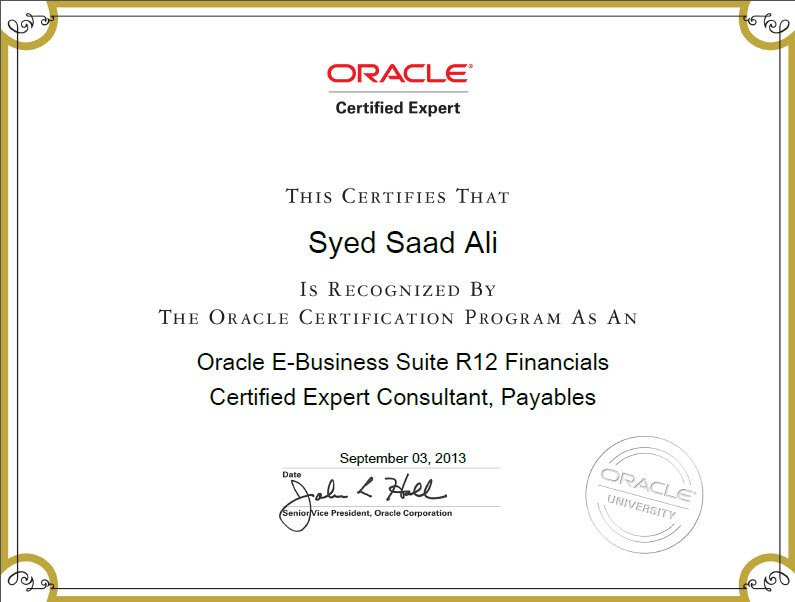
Oracle E-Business Suite R12 Financials Certified Expert  Consultant, PAYABLES 

Certificate
Oracle University
2013
Oracle University
USA

Oracle E-Business Suite R12 Financials Certified Expert  Consultant, PAYABLES 

Certificate
Oracle University
2014
Oracle University
USA

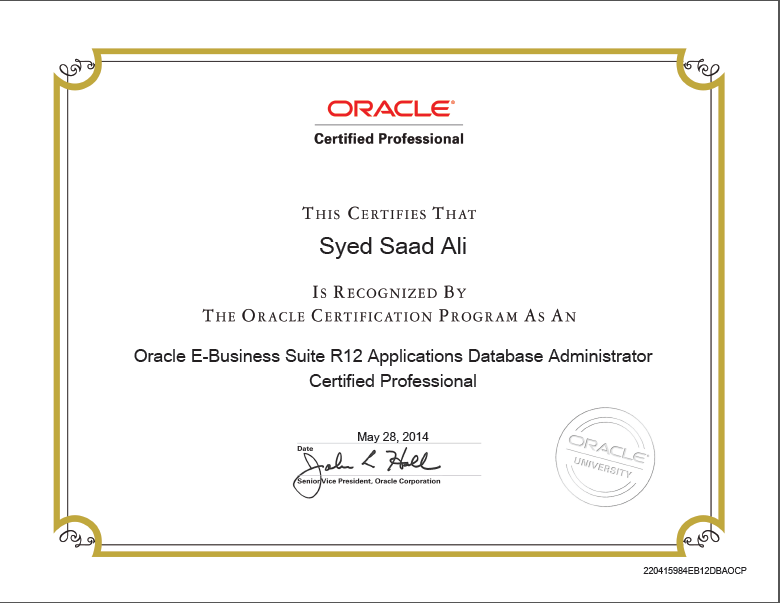
Oracle E-Business Suite R12 Applications Database Administrator Certified Professional 

Certificate
Skills
Oracle Expertise
  • Oracle Databases
  • Oracle E-Business Suite
  • Oracle Weblogic
  • Oracle Cloud Infrastructure
  • Oracle Database Appliances
Languages
  • English
System
  • Linux
    90%
  • Microsoft
    75%
  • SOLARIS
    65%
  • AIX
    60%
Knowledge
  • Installation/Configuration
  • Capacity Planning
  • Data Recovery Plan
  • Oracle Database Migration and Upgrade
  • Oracle ERP Migration and Upgrade
  • Linux and Windows management
  • Performance Evaluation

Blog

September 1, 2017 Troubleshooting AD Controller
APPS DBAErrors/Workarounds-ApplicationsOracle APPS DBA

Fixing a “Failed” worker

 Whenever  a job fails for the 1st time, the job is deferred at the end of the phase and another job is assigned to that worker.


What If the Job Fails 2nd Time?

  • If the run time of the job was < 10 min => the job is deferred at the end of the phase and another job is assigned to that Worker.
  • if the run time of the job was >= 10 min => then the  job status will be shown as “Failed”.


What If the job fails 3nd time?

If the Job fail third time the job status will be shown as “Failed”.


Review the Worker log information into

$APPL_TOP/admin/<SID>/log/adworkNNN.log

Example: adwork001.log name for the worker number 1.


After fixing error, start (if is not already started) AD Controller and to use the option 2 “Tell worker to restart a failed job”.

When prompted we have to specify the worker which must be restarted.

If all the workers are failed, we can type  all to restart all Workers.

Restarting a Failed Patch Process

During a patch process (or adadmin process) if a job fails and cannot be restarted, then the patch must be restarted.

Here are the steps for doing this:

  1. Tell worker to quit (for all workers) => to manually shutdown/ quit the workers
  2. Tell manager that a worker failed its job
  3. Tell manager that a worker acknowledges quit => the manager will stop, the AutoPatch will restart the patch

PLEASE NOTE: When the patch will restart all the information in the database about this session must be accurate.


How to determine if a process is Hanging or not

  1. We can check the log file to see if some information is added or not to the log
  2. We can determine if the worker process is consuming CPU by issuing below

$ ps -eo pcpu,pid,user,args | grep workerid

3.We check if there are any child processes, which are consuming CPU by issuing following command:

$ ps -eo pcpu,pid,ppid,user,args | grep <Parent Process> | grep -v grep


Restarting a Hanging Worker Process

1. kill at the OS level the processes associated with the Hanging Worker

$ kill -9 ProcesssNumber

2. fix the problem

3. Restart the worker (or the job)


Restart an AD utility after a Node Crash

a. Start AD Controller

b. Choose “4. Tell manager that a worker failed its job

c. Choose “2. Tell worker to restart a failed job

d. Restart the AD utility that was running when the node

Shutting down the Manager

1. Start AD Controller

2. Choose “3. Tell worker to quit

3. Verify that no worker processes are running


September 1, 2017 RapidWiz log files for Oracle Applications Release 12
APPS DBAErrors/Workarounds-ApplicationsInstallations/Configurations-ApplicationsOracle APPS DBA

RapidWiz log files for Oracle Applications Release 12


During installation of Release 12 using RapidWiz, the following log files are created.

In case of any errors during the installation,  we can use these log file locations for troubleshooting.

Before the installation starts:
The Rapidwiz Configuration File is saved in three locations,these are follows.

  • $TMP//conf_.txt
  • $INST_TOP/conf_.txt
  • /appsutil/conf_.txt


Database Tier log files are located as follows:

  • $ORACLE_HOME/appsutil/log/$CONTEXT_NAME/.logRDBMS
  • $ORACLE_HOME/appsutil/log/$CONTEXT_NAME/ApplyDBTechStack_.log
  • $ORACLE_HOME/appsutil/log/$CONTEXT_NAME/ohclone.log
  • $ORACLE_HOME/appsutil/log/$CONTEXT_NAME/make_.log
  • ORACLE_HOME/appsutil/log/$CONTEXT_NAME/installdbf.log$ORACLE_HOME/appsutil/log/
  • $CONTEXT_NAME/adcrdb_.log
  • $ORACLE_HOME/appsutil/log/$CONTEXT_NAME/ApplyDatabase_.log
  • $ORACLE_HOME/appsutil/log/$CONTEXT_NAME//adconfig.log
  • $ORACLE_HOME/appsutil/log/$CONTEXT_NAME//NetServiceHandler.log


Applications Tier(s) log files are located as follows:

  • $INST_TOP/logs/.log
  • $APPL_TOP/admin/$CONTEXT_NAME/log/ApplyAppsTechStack.log
  • $INST_TOP/logs/ora/10.1.2/install/make_.log
  • $INST_TOP/logs/ora/10.1.3/install/make_.log
  • $INST_TOP/admin/log/ApplyAppsTechStack.log
  • $INST_TOP/admin/log/ohclone.log
  • $APPL_TOP/admin/$CONTEXT_NAME/log/installAppl.log
  • $APPL_TOP/admin/$CONTEXT_NAME/log/ApplyAppltop_.log
  • $APPL_TOP/admin/$CONTEXT_NAME/log/adconfig.log
  • $APPL_TOP/admin/$CONTEXT_NAME/log/NetServiceHandler.log


Inventory Registration log files are as follows:

  • /logs/cloneActions.log
  • /logs/oraInstall.log
  • /logs/silentInstall.log


September 1, 2017 Oracle AD Controller
APPS DBAInstallations/Configurations-ApplicationsOracle APPS DBA

Oracle AD Controller

  • ADCTRL is used to manage worker processes that perform a pivotal role in the function of batch processing for patching and many other Applications activities.
  • ADCTRL is located under $AD_TOP/bin directory with Oracle E-Business Suite.


Procedure to Run AD controller


Step 1 : Login as Applications Tier user & run the environment file.

$cd /prod/ebs/apps/prodappl

$ . ./APPSORA.env


Step 2 : Run the following AD controller command.

$ adctrl

You will be prompted for the location of $APPL_TOP,  Password of APPLSYS and APPS. After providing the above information the AD controller menu will appear as shown below.


AD Controller Menu


  1. Show worker status
  2. Tell worker to restart a failed job
  3. Tell worker to quit
  4. Tell manager that a worker failed its job
  5. Tell manager that a worker acknowledges quit
  6. Restart a worker on the current machine
  7. Exit


Checking Status of the Worker


choose the first option “Show worker status“.


Note: If there is no session used by the workers, then the following message will appear:

Error: The FND_INSTALL_PROCESSES table does not exist.

This above given table is used for communication with the worker processes, and if it does not exist, it means that the workers are not running, and the ad utility has not started them yet.


Meaning of Worker Status


STATUS

Description

Waiting The worker is idle.
Assigned A job was assigned by the manager to a worker but the worker didn’t start the job.
Running The worker is running a job.
Failed The job failed due to an error.
Fixed, Restart When  a  jobs  restart  after  the  error  has  been  fixed (during this time the worker run the failed job).
Restarted After the error has been fixed, the worker will have the status “Fixed, Restart” and after that “Restarted”. (The status will not change to “Running”)
Completed The job was completed and the manager did not yet assigned another job to that worker.


Database Processing Phases Concept

  • Whenever a Database Patch operation will runs, the tasks are divided into functions. This is done by Oracle when the patch is created.
  • Suppose a patch will create 2 tables and 2 sequences. In this case the patch driver contains 2 phases, one for tables creation and one for sequences creation.
  • Because the sequences could be created in the same time, this will be done in parallel by using more workers.


Examples of Database Processing Phases:

seq = create sequence

tab = create tables, synonyms, grants privileges on tables pls = create package specification

plb = create package body

vw = create views


September 1, 2017 Undo Related Queries Part 2
APPS DBAAppsDBA ScriptsScripts

List of All active Transactions

(more…)

September 1, 2017 ORACLE APPLICATIONS R12 ARCHITECTURE
APPS DBAInstallations/Configurations-ApplicationsOracle APPS DBA

ORACLE APPLICATIONS R12 ARCHITECTURE


  • Oracle E-Business Suite Release-12 have a Multi-tiered Architecture, that supports Oracle Applications products.
  • They are comprised of a Database Tier which manages the Oracle Database and stores all data.
  • An Application Tier hosts various servers, manages communication between the desktop and database tier and contains the application file system.
  • Client Desktop through which user access Oracle Applications.


Architecture-R11i vs R12

                                              Architecture-R11i vs R12

1. Desktop Tier

  • The client interface is provided through HTML for HTML-based applications, and via a Java applet in a Web browser for the traditional Forms-based applications.
  • In Oracle Applications Release 12, each user logs in to Oracle Applications through the E-Business Suite Home Page on a desktop client web browser.
  • The E-Business Suite Home Page provides a single point of access to HTML-based applications, Forms-based applications, and Business Intelligence applications.
  • Oracle JInitiator will no longer be required to run Oracle Forms in E-Business Suite Release 12.
  • Oracle Forms in Release 12 will run directly in the native Sun Java2 Standard Edition plug-in.
  • The Forms client applet is a general-purpose presentation applet that supports all Oracle Applications Forms-based products, including those with customization and extensions.
  • The Forms client applet is packaged as a collection of Java Archive (JAR) files.
  • The JAR files contain all Java classes required to run the presentation layer of Oracle Applications forms.

2. Application Tier

  • The application tier has a dual role, hosting the various servers and service groups that process the business logic, and managing communication between the desktop tier and the database tier.
  • This tier is sometimes referred to as the middle tier.
  • Four servers or service groups comprise the basic application tier for Oracle Applications:
  1. Web services
  2. Forms services
  3. Concurrent Processing server
  4. Admin server

3. Database Tier

  • The database tier contains the Oracle database server, which stores all the data maintained by Oracle Applications.
  • The database also stores the Oracle Applications online help information. More specifically, the database tier contains the Oracle data server files and Oracle Applications database executable that physically store the tables, indexes, and other database objects for your system.
  • The database server does not communicate directly with the desktop clients, but rather with the servers on the application tier, which mediate the communications between the database server and the clients.


September 1, 2017 Oracle RMAN Commands List
Installation/Configurations10gInstallation/Configurations11gInstallation/Configurations12cOracle Database Material

Oracle RMAN Commands List

Here is the list of key most RMAN commands that are used for Backup and related activities:


LIST Commands

LIST Commands are generic RMAN commands that will show/list various types of information when executed within RMAN utility.

RMAN> list backup;

It lists all the backups taken using RMAN utility.

RMAN> list backup of database;

The above command lists out all the (individual) files that are in the backup.

RMAN> list backup of tablespace system;

The above command lists out all the files that are in the backup that belong to the tablespace ‘system’.

RMAN> list backup of control file;

The above command lists out all backups of the control file.


CONFIGURE Commands

CONFIGURE commands in RMAN are used to configure/setup various initial settings:

RMAN>CONFIGURE RETENTION POLICY TO REDUNDANCY2;

The above commands indicates how many days the backup copies need to be retained. Default is 1 day.

RMAN> CONFIGURE RETENTION POLICY CLEAR;

The above command resets the Retention policy to the default value of 1 day.

CONFIGURE BACKUP OPTIMIZATION ON;

The above command verifies to make sure that identical files are NOT backed up to the device specified.

CONFIGURE BACKUP OPTIMIZATION CLEAR;

The above command resets the Optimization option to the default value.


SHOW Commands

Show commands are used to show/display the configuration setting values.

RMAN> show all;

The above command shows all the current configuration settings on the screen.

RMAN> show retention policy;

The above command shows the current retention policy.

RMAN> show default device type;

The above command shows the default device type configured for backups.

RMAN> show datafile backup copies;

The above command shows the number of backup copies available in the target database.


BACKUP Commands

Backup commands are the real commands which do the actual backup work.

RMAN> backup database;

The above command backs up the database (target).

RMAN> backup database include current controlfile plus archive log;

The above command backs up the target database and the current control file and archive log files.


REPORT Commands

Report commands list/report specific information. The difference between report and list command is report command output is in a better format.

RMAN> report obsolete;

The above command reports which backups can be deleted.


DELETE Commands

Delete commands delete/remove specific items from the server, repository catalog.

RMAN> delete obsolete;

The above command deletes all the backups that are older based on the retention policy setup.


Contact

Get in Touch
  • Address: Karachi, PAKISTAN
  • Email: askme@SyedSaadAli.com
  • Phone: +92-300-026-5668
  • Freelance: Available
Contact Form