Syed Saad Ali

Oracle ACE Pro

Oracle Solution Architect

Oracle E-Business Suite

Oracle Cloud Infrastructure

Oracle Fusion Middleware

Oracle Database Administration

Oracle Weblogic Administration

Syed Saad Ali

Oracle ACE Pro

Oracle Solution Architect

Oracle E-Business Suite

Oracle Cloud Infrastructure

Oracle Fusion Middleware

Oracle Database Administration

Oracle Weblogic Administration

Home

About Me

Technically-sophisticated professional with extensive experience in updating server security, executing routine back-ups, and designing and implementing tests of the system to address issues with accessing data

  • Adept at leading the planning, designing, developing, testing, and deploying efficient solutions within Oracle EBS system, in order to satisfy strategic, financial, and operations needs of the organization.
  • Skilled in planning and managing successful projects, mitigating risks, controlling costs, and directing project teams. Instrumental in monitoring routine maintenance of system, implementing the ERP systems, and approving budget.
  • Proven success in analyzing business processes/process re-engineering and recommending solutions. Deft at establishing IT service continuity management strategies, disaster recovery plans and associated test procedures of each critical functional area of the organization.
  • Age: 37
  • Residence: Pakistan
  • Freelance: Available
  • Address: Karachi, PAKISTAN
My Services
Oracle E-Business Suite Upgrade
Oracle E-Business Suite Migration
Oracle Database Upgrade or Migrate
Oracle Maximum Availability Architecture
Performance Evaluation
Pricing
Hire Me On Upwork
$ 35 Hour
  • Database Administration
  • Oracle E-Business Suite Administration
  • Configuration, Administration, Cloning, Patching, Migrating, Support, Maintenance, Monitoring, tuning and capacity planning, User Management, Backup/Recovery Management
Hire Me on Fiverr
$ 35 Hour
  • Database Administration
  • Oracle E-Business Suite Administration
  • Configuration, Administration, Cloning, Patching, Migrating, Support, Maintenance, Monitoring, tuning and capacity planning, User Management, Backup/Recovery Management
Hire Team
$ 40 Hour
  • Database Administration
  • Oracle E-Business Suite Administration
  • Configuration, Administration, Cloning, Patching, Migrating, Support, Maintenance, Monitoring, tuning and capacity planning, User Management, Backup/Recovery Management

Resume

Experience
2024-
Senior Apps DBA
Private Contractor
My role includes infrastructure support, capacity planning, installation, configuration, database design, and migration, up gradation, performance monitoring, security,  database backups, data recovery plan, and procedures including application server administration
Senior Apps DBA
2022- 2024
Senior Apps DBA
Computer & Systems Engineering Company
My role includes infrastructure support, capacity planning, installation, configuration, database design, and migration, up gradation, performance monitoring, security,  database backups, data recovery plan, and procedures including application server administration
Lead Infrastructure Consultant
2020-2021
Lead Infrastructure Consultant
ITANZ Group
Managed Oracle cloud infrastructure, compute, storage, networking, connectivity, and edge service, database management, analytics, integration, and Oracle weblogic clustering environment over Oracle Cloud IAAS.  Collaborated with the Oracle corporation staff for offering technical support to diagnose and troubleshoot common problems.
Professional Freelancer
2020 - 2022
Professional Freelancer
Upwork Inc.
Collaborated with Clients for the Task Related to Oracle Database, Oracle E-Business Suite, Oracle Cloud Infrastructure, Oracle Weblogic
Assistant Director (Databases)
2015-2020
Assistant Director (Databases)
Pakistan Civil Aviation Authority
Managed ERP for implementing the structures effectively, while limiting the resources consumed in the planning process. Improved IT/business processes and investigations to resolve the user’s issues as well as offered user’s training to help the user in operating the system in efficient way.
Education
Newports Institute Of Communication & Economics
2008 - 2011
Newports Institute Of Communication & Economics
Pakistan

Newports Institute Of Communication & Economics offers a B.S. in Computer Science.

Certificate
Oracle University
2013
Oracle University
USA

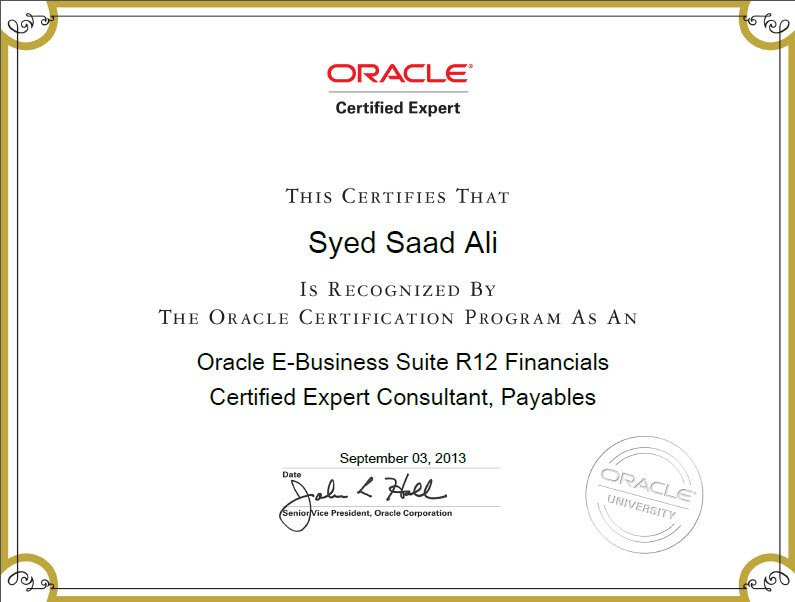
Oracle E-Business Suite R12 Financials Certified Expert  Consultant, PAYABLES 

Certificate
Oracle University
2013
Oracle University
USA

Oracle E-Business Suite R12 Financials Certified Expert  Consultant, PAYABLES 

Certificate
Oracle University
2014
Oracle University
USA

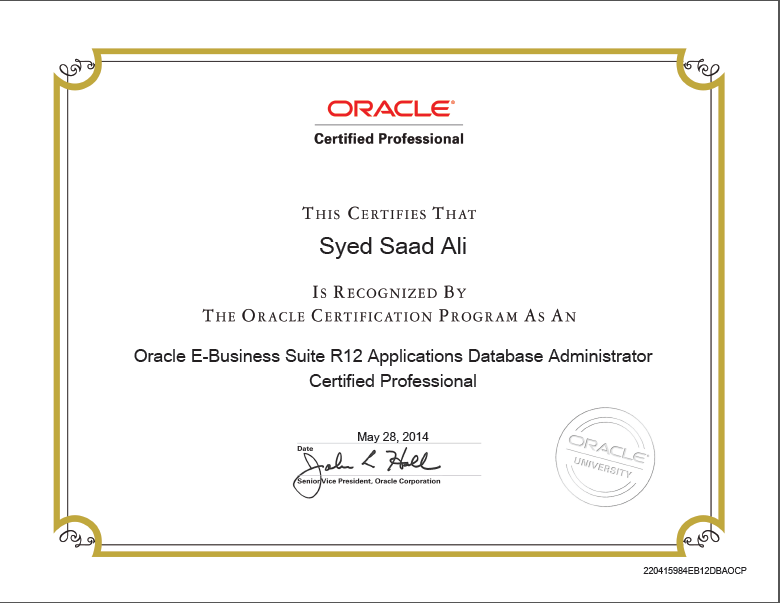
Oracle E-Business Suite R12 Applications Database Administrator Certified Professional 

Certificate
Skills
Oracle Expertise
  • Oracle Databases
  • Oracle E-Business Suite
  • Oracle Weblogic
  • Oracle Cloud Infrastructure
  • Oracle Database Appliances
Languages
  • English
System
  • Linux
    90%
  • Microsoft
    75%
  • SOLARIS
    65%
  • AIX
    60%
Knowledge
  • Installation/Configuration
  • Capacity Planning
  • Data Recovery Plan
  • Oracle Database Migration and Upgrade
  • Oracle ERP Migration and Upgrade
  • Linux and Windows management
  • Performance Evaluation

Blog

May 27, 2017 Login issues in Oracle E-Business Suite R12
APPS DBAErrors/Workarounds-Applications


ERROR


The http error_log had the below error:

oc4j_socket_recvfull timed out

The Application log has the below error:

15/09/16 05:30:20.511 html: Servlet error

java.lang.OutOfMemoryError: Java heap space

15/09/16 05:30:20.503 html: Servlet error

The opmn log had the below error:

15/09/16 05:30:20 java.lang.OutOfMemoryError: Java heap space

15/09/16 05:30:20 java.lang.OutOfMemoryError: Java heap space

15/09/16 05:30:20 java.lang.OutOfMemoryError: Java heap space

15/09/16 05:30:20 Exception in thread “Timer-1” java.lang.OutOfMemoryError: Java heap space

oracle.jbo.DMLException: JBO-26066: Error during rollback


SOLUTION

Change Xms ( for start heap memory ) and -Xmx ( for maximum heap memory ) of the opmn.xml.

Changing the Xmx to 512 MB and Xms to 128 MB will help.

Increase Java Heap Size for the OC4J instance as per the available memory (RAM) & restart the instance.

  1. Do it with AS Control -> OC4J Instance -> Administration Tab -> Server Properties -> Java  options.
  2. Update -Xms -Xmx java options.
  3. Once updated, stop and start the OC4J instance to pick up the changes.


May 25, 2017 Concurrent managers are down with status: System Hold, Fix Manager
APPS DBAErrors/Workarounds-Applications

ERROR

All the concurrent managers are down with a status message: system hold, fix manager.

The administer Concurrent manager screen has Actual: 0 and Target: 1 for all managers.


SOLUTION

1. Make sure all application services are down.

2.Now, check the system profile Concurrent: GSM Enabled. This should be set to ‘Y’

3. Execute Sql Script given below by APPS User

  • $FND_TOP/patch/115/sql/afdcm037.sql

4. Relink the below mentioned executables:

 adrelink.sh force=y “fnd FNDLIBR”

                                           adrelink.sh force=y “fnd FNDSM”

                                           adrelink.sh force=y “fnd FNDFS”

                                           adrelink.sh force=y “fnd FNDCRM”


5. Execute cmclean.sql to clean out the Concurrent Manager tables.

6. Start all the application services and restest the issue.


May 24, 2017 RC-50221: Warning: Port pool not free in R12 while running adcfgclone.pl
APPS DBAErrors/Workarounds-Applications

ERROR

RC-50221: Warning: Port pool not free in R12 while running adcfgclone.pl

I was getting the error below while running adcfgclone in R12.2 for run file system. While selecting the port pool value, i was getting the error saying one of the port pool is not free. upon checking the logs i found out OACORE (port no – 7214) is used by some processes which is causing this issue.

Error from the log :

Checking  WLS Admin Server Port on ahqtest:  Port Value = 7013
   WLS Admin Server Port available:  Port Value = 7013
 Checking  WLS OACORE Application Port on ahqtest:  Port Value = 7214
RC-50204: Error: – WLS OACORE Application Port in use: Port Value = 7214


SOLUTION

1.Find out the process using your port through the below given scripts. You need to supply port value as an input while executing the script.

  • For Example#
  • $./get_port_pid.sh 7214

Create Script As get_port_pid.sh:

#!/bin/bash

# Get the process which listens on port

# $1 is the port we are looking for

if [ $# -lt 1 ]
then
echo “Please provide a port number parameter for this script”
echo “e.g. $0 22”
exit
fi

echo “Greping for your port, please be patient (CTRL+C breaks) … “

for i in `ls /proc`
do
pfiles $i | grep AF_INET | grep $1
if [ $? -eq 0 ]
then
echo Is owned by pid $i
fi

2.Get the Process ID through above script and KILL it at OS level

3.Now, run adcfgclone.pl script.


May 23, 2017 ORA-00845: MEMORY_TARGET not supported on this system
Errors/Workarounds11gOracle Database Material

ERROR

SQL> startup nomount;

ORA-00845: MEMORY_TARGET not supported on this system

SOLUTION

[oracle@oel6 ~]$ df -h
Filesystem            Size  Used Avail Use% Mounted on
/dev/mapper/vg_oel6-lv_root
                       43G   15G   26G  37% /
tmpfs                1001M  212M  789M  22% /dev/shm
/dev/sda1             485M   55M  405M  12% /boot
.host:/               245G  126G  119G  52% /mnt/hgfs

Change the size of that files System by issuing the following command:

mount -t tmpfs shmfs -o size=2g /dev/shm

The shared memory file system should be big enough to accommodate the MEMORY_TARGET and MEMORY_MAX_TARGET values, else Oracle will throw the ORA-00845 error.

Note: While changing something with the mount command, the changes are not permanent.
To make the change persistent, edit your /etc/fstab file
tmpfs                   /dev/shm                tmpfs   defaults,size=2G         0 0
May 22, 2017 REP-50125: Caught exception: java.lang.reflect.InvocationTargetException
APPS DBAErrors/Workarounds-Applications

ERROR

REP-50125: Caught exception: java.lang.reflect.InvocationTargetException

$ rwdiag.sh -findAll
Environment:Environment java.lang.UnsatisfiedLinkError: Can’t find library rwu (librwu.a or .so) in sun.boot.library.path or java.library.path
sun.boot.library.path=/u01/apps/apps/tech_st/10.1.2/jdk/jre/bin
java.library.path=/u01/apps/apps/tech_st/10.1.2/jdk/bin:/u01/apps/apps/tech_st/10.1.2/jdk/jre/bin/classic:/u01/apps/apps/tech_st/10.1.2/jdk/jre/bin:/u01/apps/apps/tech_st/10.1.2/jdk/jre/bin:/u01/apps/apps/tech_st/10.1.2/jdk/jre/bin/classic:/u01/apps/apps/tech_st/10.1.2/lib32:/u01/apps/apps/tech_st/10.1.2/lib:/usr/dt/lib:/u01/apps/apps/tech_st/10.1.2/jdk/jre/bin:/u01/apps/apps/tech_st/10.1.2/jdk/jre/bin/classic:/u01/apps/apps/apps_st/appl/cz/12.0.0/bin:/u01/apps/apps/tech_st/10.1.2/lib32:/u01/apps/apps/tech_st/10.1.2/lib:/usr/dt/lib:/u01/apps/apps/tech_st/10.1.2/jdk/jre/bin:/u01/apps/apps/tech_st/10.1.2/jdk/jre/bin/classic:/u01/apps/apps/apps_st/appl/sht/12.0.0/lib:/u01/apps/apps/tech_st/10.1.2/jdk/jre/lib/ppc:/u01/apps/apps/tech_st/10.1.2/jdk/jre/bin/sovvm:/usr/lib
Environment:getEnvironmentStrings java.lang.UnsatisfiedLinkError: Can’t find library rwu (librwu.a or .so) in sun.boot.library.path or java.library.path
sun.boot.library.path=/u01/apps/apps/tech_st/10.1.2/jdk/jre/bin
java.library.path=/u01/apps/apps/tech_st/10.1.2/jdk/bin:/u01/apps/apps/tech_st/10.1.2/jdk/jre/bin/classic:/u01/apps/apps/tech_st/10.1.2/jdk/jre/bin:/u01/apps/apps/tech_st/10.1.2/jdk/jre/bin:/u01/apps/apps/tech_st/10.1.2/jdk/jre/bin/classic:/u01/apps/apps/tech_st/10.1.2/lib32:/u01/apps/apps/tech_st/10.1.2/lib:/usr/dt/lib:/u01/apps/apps/tech_st/10.1.2/jdk/jre/bin:/u01/apps/apps/tech_st/10.1.2/jdk/jre/bin/classic:/u01/apps/apps/apps_st/appl/cz/12.0.0/bin:/u01/apps/apps/tech_st/10.1.2/lib32:/u01/apps/apps/tech_st/10.1.2/lib:/usr/dt/lib:/u01/apps/apps/tech_st/10.1.2/jdk/jre/bin:/u01/apps/apps/tech_st/10.1.2/jdk/jre/bin/classic:/u01/apps/apps/apps_st/appl/sht/12.0.0/lib:/u01/apps/apps/tech_st/10.1.2/jdk/jre/lib/ppc:/u01/apps/apps/tech_st/10.1.2/jdk/jre/bin/sovvm:/usr/lib
java.lang.reflect.InvocationTargetException
oracle.reports.RWException: IDL:oracle/reports/RWException:1.0

Broadcast mechanism used to locate servers
——————————————
Channel address = 228.5.6.7
Channel port = 14021

REP-50503 No server found in the network

$ rwrun help=yes
JVMCI200 – ERROR: User register saving is not enabled, Garbage Collection could be incorrect.
JVMCI200 – ERROR: because of this the JVM library is explicitly aborting the process
JVMCI200 – ERROR: You must either rebuild the executable using “-bM:UR”
JVMCI200 – ERROR: or run with “export LDR_CNTRL=USERREGS”
IOT/Abort trap(coredump)

$ $INST_TOP/ora/10.1.2/bin/appsrwrun.sh userid=apps/apps mode=character report=$FND_TOP/reports/US/FNDSCURS.rdf batch=yes destype=file desname=./ddr2.out desformat=$FND_TOP/reports/HPL pagesize=132×66 traceopts=trace_all tracefile=ddr2.trc tracemode=trace_replace
Environment:Environment java.lang.UnsatisfiedLinkError: Can’t find library rwu (librwu.a or .so) in sun.boot.library.path or java.library.path
sun.boot.library.path=/u01/apps/apps/tech_st/10.1.2/jdk/jre/bin
java.library.path=/u01/apps/apps/tech_st/10.1.2/jdk/jre/bin:/u01/apps/apps/tech_st/10.1.2/jdk/jre/bin/classic:/u01/apps/apps/tech_st/10.1.2/lib32:/u01/apps/apps/tech_st/10.1.2/lib:/usr/dt/lib:/u01/apps/apps/tech_st/10.1.2/jdk/jre/bin:/u01/apps/apps/tech_st/10.1.2/jdk/jre/bin/classic:/u01/apps/apps/apps_st/appl/cz/12.0.0/bin:/u01/apps/apps/tech_st/10.1.2/lib32:/u01/apps/apps/tech_st/10.1.2/lib:/usr/dt/lib:/u01/apps/apps/tech_st/10.1.2/jdk/jre/bin:/u01/apps/apps/tech_st/10.1.2/jdk/jre/bin/classic:/u01/apps/apps/apps_st/appl/sht/12.0.0/lib:/u01/apps/apps/tech_st/10.1.2/jdk/jre/lib/ppc:/u01/apps/apps/tech_st/10.1.2/jdk/jre/bin/sovvm:/usr/lib
Environment:getEnvironmentStrings java.lang.UnsatisfiedLinkError: Can’t find library rwu (librwu.a or .so) in sun.boot.library.path or java.library.path
sun.boot.library.path=/u01/apps/apps/tech_st/10.1.2/jdk/jre/bin
java.library.path=/u01/apps/apps/tech_st/10.1.2/jdk/jre/bin:/u01/apps/apps/tech_st/10.1.2/jdk/jre/bin/classic:/u01/apps/apps/tech_st/10.1.2/lib32:/u01/apps/apps/tech_st/10.1.2/lib:/usr/dt/lib:/u01/apps/apps/tech_st/10.1.2/jdk/jre/bin:/u01/apps/apps/tech_st/10.1.2/jdk/jre/bin/classic:/u01/apps/apps/apps_st/appl/cz/12.0.0/bin:/u01/apps/apps/tech_st/10.1.2/lib32:/u01/apps/apps/tech_st/10.1.2/lib:/usr/dt/lib:/u01/apps/apps/tech_st/10.1.2/jdk/jre/bin:/u01/apps/apps/tech_st/10.1.2/jdk/jre/bin/classic:/u01/apps/apps/apps_st/appl/sht/12.0.0/lib:/u01/apps/apps/tech_st/10.1.2/jdk/jre/lib/ppc:/u01/apps/apps/tech_st/10.1.2/jdk/jre/bin/sovvm:/usr/lib
REP-50125: Caught exception: java.lang.reflect.InvocationTargetException


SOLUTION 1

1. Take a backup and remove rwnetwork.conf from $ORACLE_HOME/reports/conf

  • $ mv rwnetwork.conf rwnetwork.conf_orig

2. Stop/restart Applications tier.

3. You need to ensure rwnetwork.conf is created on its own. As rwnetwork.conf is removed , the system should generate new file automatically after the reports are run.

4.Reproduce the issue and check the following commands work fine to ensure the issue is resolved.

  1. rwdiag.sh -findAll 
  2. rwrun help=yes 
  3. INST_TOP/ora/10.1.2/bin/appsrwrun.sh userid=apps/apps mode=character report=$FND_TOP/reports/US/FNDSCURS.rdf batch=yes destype=file   desname=./ddr2.outdesformat=$FND_TOP/reports/HPL pagesize=132×66 traceopts=trace_all tracefile=ddr2.trc tracemode=trace_replace

5.Run the Concurrent Request 

[edsanimate_start entry_animation_type= “fadeIn” entry_delay= “0.5” entry_duration= “0.5” entry_timing= “linear” exit_animation_type= “” exit_delay= “” exit_duration= “” exit_timing= “” animation_repeat= “infinite” keep= “yes” animate_on= “load” scroll_offset= “” custom_css_class= “”]
Reference : Concurrent Processing – R12 Concurrent Requests Run Forever, rwrun Errors with REP-50125 (Doc ID 737445.1)


[edsanimate_end]

SOLUTION 2

If not resolved Follow below steps.

1. Relink the reports executables:

  • cd $ORACLE_HOME/reports/lib32
  • make -f ins_reports.mk install

[edsanimate_start entry_animation_type= “fadeIn” entry_delay= “0.5” entry_duration= “0.5” entry_timing= “linear” exit_animation_type= “” exit_delay= “” exit_duration= “” exit_timing= “” animation_repeat= “infinite” keep= “yes” animate_on= “load” scroll_offset= “” custom_css_class= “”]

Reference : Concurrent Reports UnsatisfiedLinkError (Doc ID 849369.1)

[edsanimate_end]



May 20, 2017 ORA-01078: failure in processing system parameters ORA-29701: unable toconnect to Cluster Synchronization Service
Errors/Workarounds11gOracle Database Material

ERROR

startup of ASM instance failed with error:
ORA-01078: failure in processing system parameters
ORA-29701: unable to connect to Cluster Synchronization Service

SOLUTION

check services by command:

crs_stat -t

Name           Type           Target    State     Host        
------------------------------------------------------------
ora.DATA.dg    ora....up.type OFFLINE   OFFLINE      
ora....ER.lsnr ora....er.type ONLINE    ONLINE    orcl01   
ora....2C.lsnr ora....er.type ONLINE    ONLINE    orcl01   
ora.asm        ora.asm.type   OFFLINE   OFFLINE      
ora.cssd       ora.cssd.type  ONLINE    ONLINE    orcl01   
ora.diskmon    ora....on.type ONLINE    ONLINE    orcl01   
ora.orcl.db    ora....se.type OFFLINE   OFFLINE    


Start services manually

#crsctl start resource ora.cssd

CRS-2672: Attempting to start 'ora.cssd' on 'orcl01'
CRS-2679: Attempting to clean 'ora.diskmon' on 'orcl01'
CRS-2681: Clean of 'ora.diskmon' on 'orcl01' succeeded
CRS-2672: Attempting to start 'ora.diskmon' on 'orcl01'
CRS-2676: Start of 'ora.diskmon' on 'orcl01' succeeded
CRS-2676: Start of 'ora.cssd' on 'orcl01' succeeded

#sqlplus / as sysasm

SQL*Plus: Release 11.2.0.1.0 Production on Fri Jan 25 12:35:10 2015

Copyright (c) 1982, 2009, Oracle.  All rights reserved.

Connected to an idle instance.

SQL> startup;
ASM instance started

Total System Global Area  283930624 bytes
Fixed Size                  2212656 bytes
Variable Size             256552144 bytes
ASM Cache                  25165824 bytes
ASM diskgroups mounted


Contact

Get in Touch
  • Address: Karachi, PAKISTAN
  • Email: askme@SyedSaadAli.com
  • Phone: +92-300-026-5668
  • Freelance: Available
Contact Form